Index of /misc1/FTP4DOS
FTP4DOS
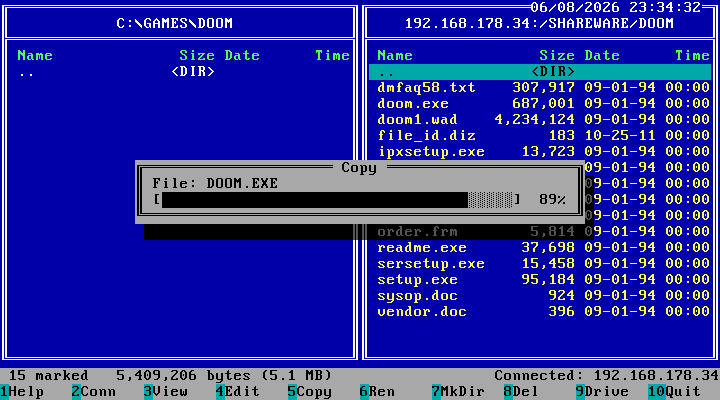
A Norton Commander-style dual-panel FTP client for MS-DOS running on any x86 machine. The left panel shows the local DOS filesystem; the right panel connects to an FTP server via the mTCP TCP/IP stack. Fully keyboard-driven in 80x25 text mode.
Download latest release https://github.com/Projanglez/ftp4dos/releases/latest
Projanglez on GitHub https://github.com/Projanglez
Features
Two panels: local (DOS) and remote (FTP, passive mode)
Copy in both directions (F5), including recursive directory trees, with live transfer telemetry (current/average speed, per-file and batch ETA)
Pause (P) and cancel (ESC) during a running transfer
Multiple selection with the Ins key (Norton style) for copy/move/delete
Move (F6) and rename (Alt+F6); recursive move/copy/delete for whole directory trees
Create directories (F7) and recursive delete (F8); Copy/Move/Delete confirm with recursive file/directory counts and total size
Configurable per-panel sorting (Alt+F3): by name, extension, size, date or time, ascending or descending
File checksums (Alt+F9): CRC32 + MD5 for local and remote files, optionally saved to a file
Swap the two panels left/right with Ctrl+U (remembered across launches)
Navigate directories; view files with F3 (or Enter) up to 32 KB displayed
Remote view (F3) downloads to a temporary file first, then opens the viewer
Edit local text files with F4 minimal full-screen editor (~32 KB, local only)
Compact size display for large files (M/G units); locale-aware number/date/time formatting from the DOS country setting
FTP connection keepalive: sends NOOP every 60 s to prevent server idle timeouts
Bilingual German/English UI (auto-detected from DOS country setting, or forced on the command line: FTP4DOS /L:EN)
![[ICO]](/icons/blank.gif)
![[PARENTDIR]](/icons/back.gif)
![[DIR]](/icons/folder.gif)